kudos punk
guide
kudos punk
guide
kudos punk
guide
kudos punk
guide
kudos punk
guide
kudos punk
guide
kudos punk
guide
guide
kudos punk
guide
kudos punk
guide
kudos punk
guide
kudos punk
guide
kudos punk
guide
kudos punk
guide
kudos punk

Kudos Punk
Setup Guide

Peer recognition that lives inside Slack. Three minutes to install. Bot bundles your shoutouts into a weekly, monthly, or quarterly summary — your choice.

Step 0 · Three things you need

Prerequisites

Before installing the Slack recognition bot, get these three things ready. Two minutes.

01

HR Punks workspace

An HR Punks account with admin access. Sign up free and Kudos Punk is one click from the Apps catalog.

02

Slack workspace admin

Workspace admin (or owner) privileges in Slack. Required to approve the OAuth scopes during install.

03

One Slack channel

A public or private channel where the periodic kudos summary will post. The bot auto-joins on selection.

3 steps · 3 minutes · no code

Install Kudos Punk for Slack

Three steps to get the Slack recognition bot running in your workspace. You do this once. After that, shoutouts are automatic.

3 steps One-time setup No code
  1. Step 01 / 03 About 30 seconds

    Find Kudos Punk in the App catalog

    Open Settings → Apps in your HR Punks dashboard. Find the Kudos Punk tile and click Install.

    Admin access required. The Apps page lists every HR Punks add-on. Kudos Punk is free for the first 30 days, no card.

    Open HR Punks Apps
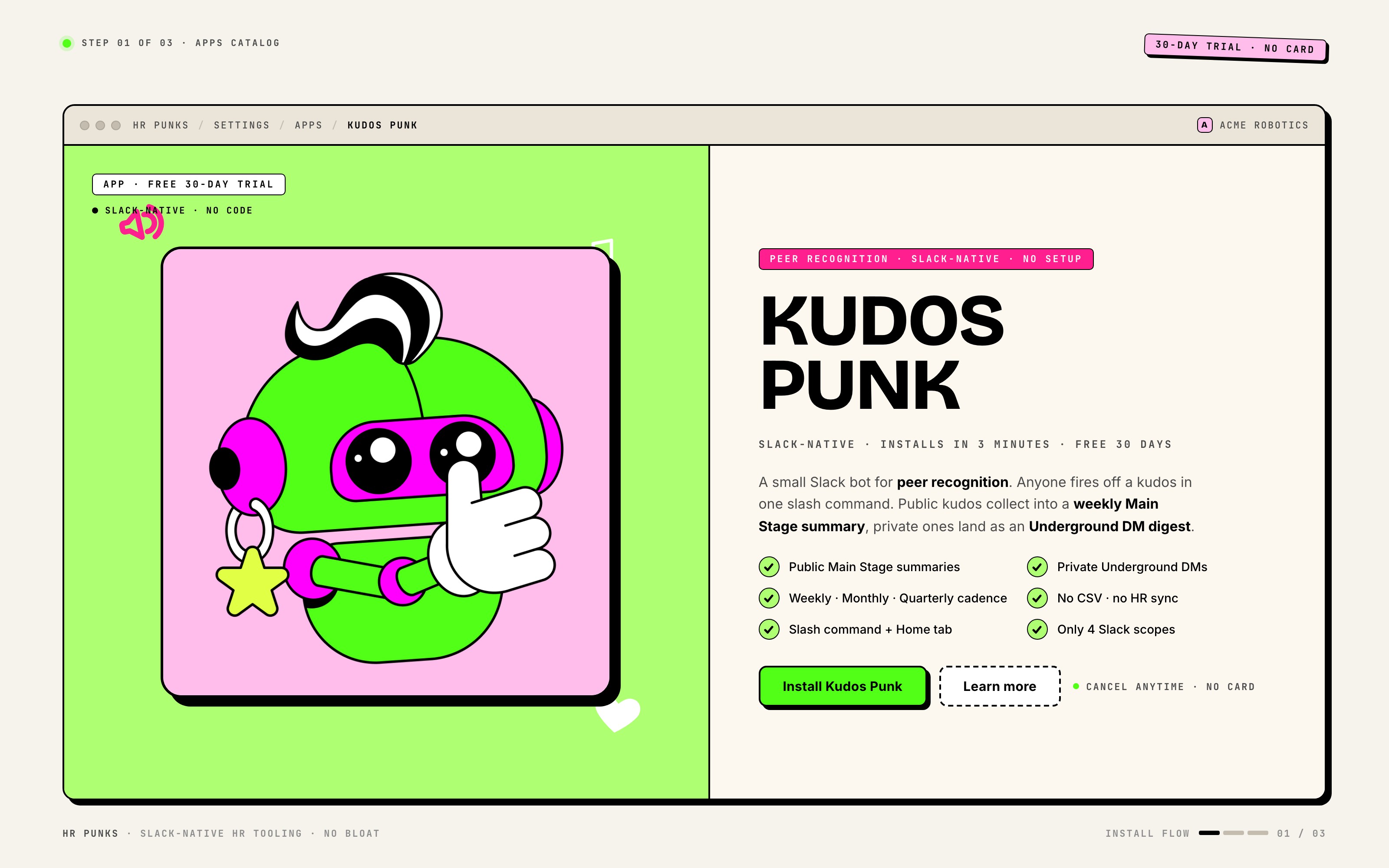
    HR Punks Apps catalog with the Kudos Punk tile selected and its Install button highlighted.
    Outcome

    You land on the Kudos Punk app tile, ready to install.
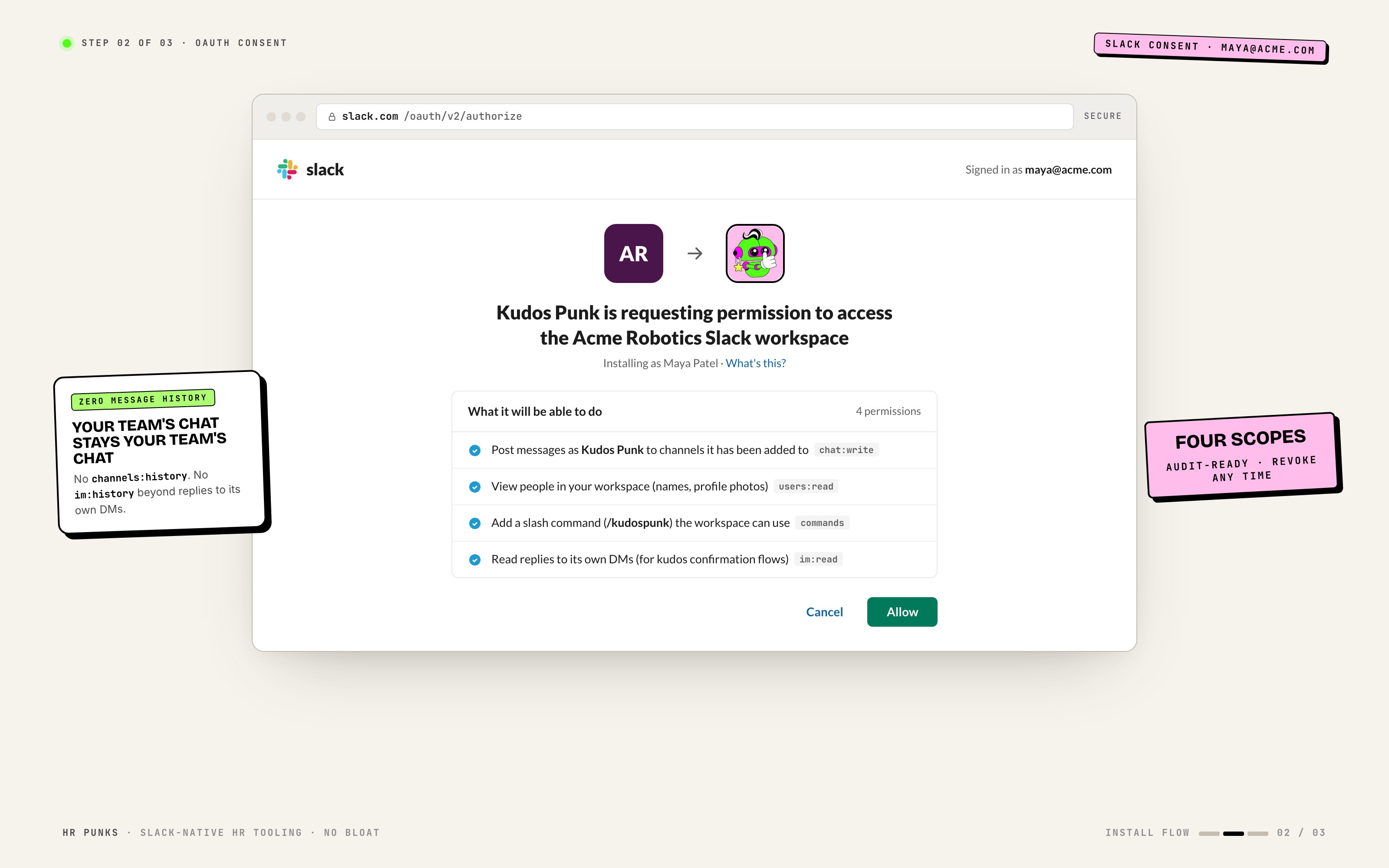
  2. Step 02 / 03 Under a minute

    Authorize the Slack scopes

    Slack shows its OAuth consent screen. Review the permissions, click Allow to connect your workspace.

    Post messages, read user profiles, run slash commands, read bot DMs. No channel history access. Workspace owner can revoke any time from Slack Settings → Apps.

    Slack OAuth consent screen for Kudos Punk listing the requested scopes.
    Outcome

    Slack redirects you back to HR Punks, connected.

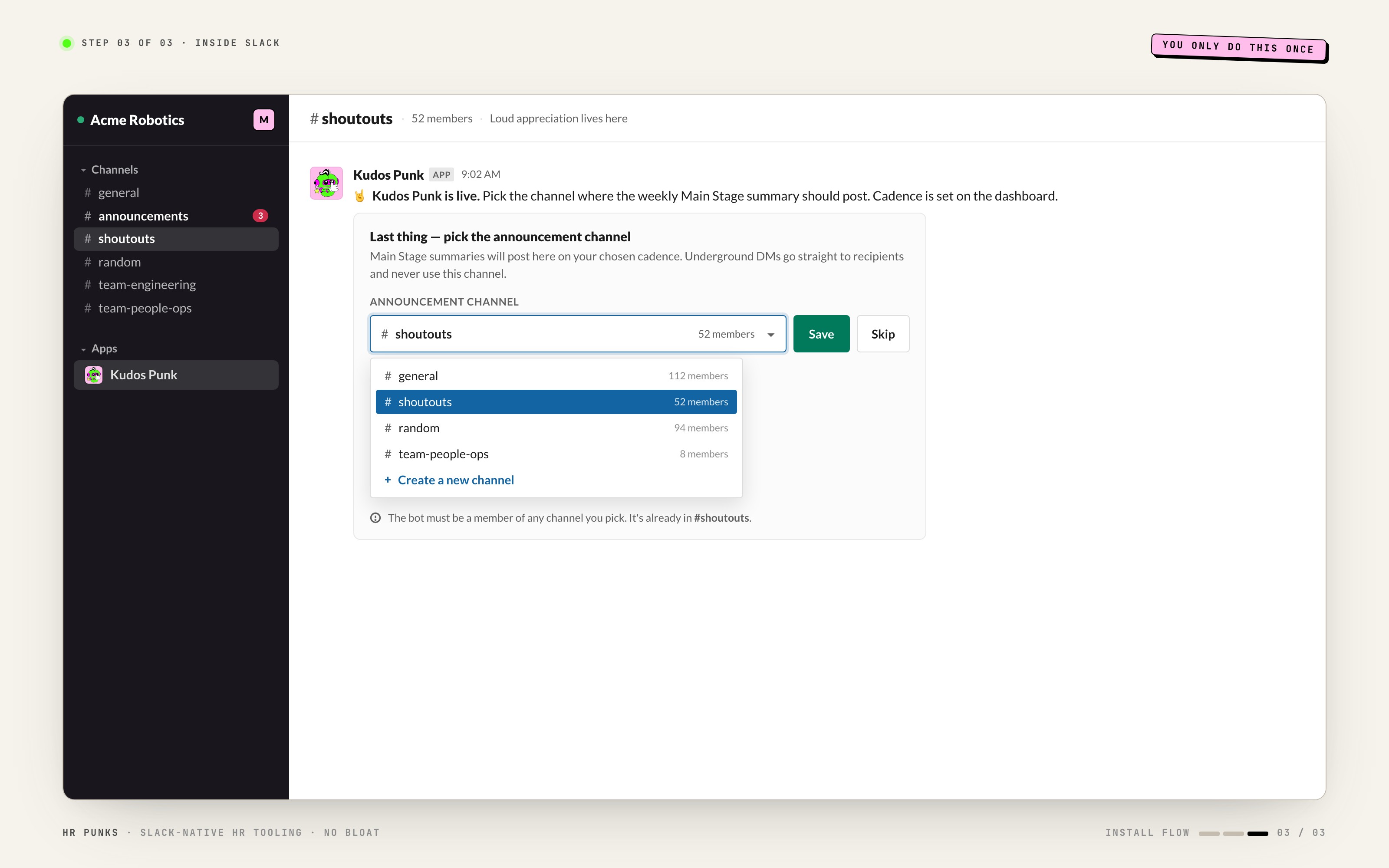
  3. Step 03 / 03 30 seconds

    Pick your announcement channel

    Open the Kudos Punk App Home in Slack. Click Select Channel under Admin Controls and pick where the periodic summary should post.

    Required to unlock the public Home tab sections and the periodic summary. Default cadence is weekly. The bot auto-joins the channel you pick.

    Kudos Punk first run inside Slack with the Select Channel modal open and #shoutouts selected.
    Outcome

    Bot is live. The next public kudos joins the upcoming summary automatically.

You're set

Bot runs itself from here

  • Kudos collect between summary posts automatically
  • Public kudos bundle into the announcement channel on schedule
  • Private kudos go straight to recipient as a DM digest

Channel + cadence

Pick your channel and cadence

Two settings to configure before your first summary fires. The announcement channel is required. Cadence defaults to weekly and you can change it any time.

Required

Select an announcement channel in Admin Controls before anything else. Nothing public posts until a channel is set.

WeeklyCadence

Every Monday morning

Best for teams that recognise often and want momentum to compound week over week.

MonthlyCadence

First of each month

Good fit when you want recognition to feel like a curated digest rather than a constant feed.

QuarterlyCadence

Start of each quarter

For teams that want kudos to align with quarterly review rhythm.

2 settings · all defaults shown

Settings reference

Kudos Punk has two settings. Channel is required. Cadence defaults to Weekly. Both live in Admin Controls inside the Slack Home tab and in the web dashboard.

Announcement channelDefault: None (required)

The Slack channel where the public kudos summary posts. The bot joins automatically when you pick it. This is the only required setting — nothing public goes out until it is set.

Recognition cadenceDefault: Weekly

How often public kudos are bundled into a summary post. Weekly lands every Monday morning. Monthly lands on the first of each month. Quarterly lands at the start of each quarter.

WeeklyMonthlyQuarterly

Home tab · slash commands · send flow

Inside Slack

The Slack recognition bot lives in your workspace. App Home for every user, three slash commands, and a two-path send flow for public or private kudos.

Three commands · everyone

Slash commands

3 commands

Type /kudospunk and the bot responds in-channel. Three commands available to every teammate in your workspace.

CommandDescription
/kudospunk @teammate great work on the demoSends a kudos to one or more teammates. Choose Main Stage (public) or Underground (private) before confirming.
/kudospunk shoutout to the whole team for the launchBroadcasts general appreciation to everyone — no specific recipients. Joins the next public summary automatically.
/kudospunk helpFull command reference, basic moves, and admin contact.

App Home · per user

A personal Home tab for every teammate

9 sections

Nine sections covering your stats, pending shoutouts, recent kudos given and received, leaderboards, and admin controls.

  • Give Kudos button

    Primary CTA at the top of the Home tab. Opens the kudos modal: pick recipients, write the message, choose Main Stage or Underground.

  • Stats

    Period bounds plus four counters: kudos given this period, kudos received this period, total given all-time, total received all-time.

  • Pending Shoutouts

    Public kudos you sent this period that have not been published yet. They will appear in the next periodic summary.

  • Your Recent Shoutouts (Given)

    Your ten most recent kudos to teammates, with a link to the full history in the web dashboard.

  • Your Latest Hits (Received)

    Your ten most recent kudos received, with a link to the Hall of Fame in the web dashboard.

  • Most Appreciated Artists

    Top ten kudos receivers for this period and all-time. Read-only public leaderboard.

  • Top Rockstars

    Top ten kudos givers for this period and all-time. The people powering your recognition culture.

  • Quick Commands

    Inline cheat sheet of the most common /kudospunk forms and the help command.

  • Admin Controls

    Admins only

    Two controls inside the Home tab: a current-channel readout and a Change Channel button that opens the channel picker modal. Cadence is changed from the web dashboard.

Main Stage or Underground

Send a kudos in three moves

Open the modal or use the slash command. Three moves to send recognition. You choose the stage before confirming.

1
Stage 01 / 03
Pick your recipients

Mention one or more teammates in /kudospunk, or pick them in the modal. You can send a single kudos to multiple people at once.

2
Stage 02 / 03
Write the message

Free-form text up to about a thousand characters. Be specific - recognition lands harder when the receiver can picture the moment.

3
Stage 03 / 03
Choose Main Stage or Underground

Main Stage joins the next public summary in your announcement channel. Underground delivers as a private DM digest to the recipient only.

Two paths · one choice

Main Stage vs Underground

Every kudos lands on one of two stages. Pick at send time. You can not change it after posting.

Main Stage (public)

When
You want the whole team to see it.
Where
Joins the next periodic summary in your announcement channel.
Timing
Posts on the next scheduled summary — Monday morning if you're weekly, first of the month if monthly, start of the quarter if quarterly.
Visibility
Everyone in the announcement channel sees the kudos thread.

Underground (private)

When
Recognition is personal — a one-to-one moment.
Where
Goes only to the recipient as a private DM digest.
Timing
Bundled into the same cadence as Main Stage. Recipient sees one DM containing every Underground kudos they got this period.
Visibility
Only the recipient sees it. No one else in the workspace ever knows it was sent.

On the web · admin view

Web dashboard

The web dashboard gives every user a personal view of kudos received, given, and public. Admins also see org-wide leaderboards and can change cadence.

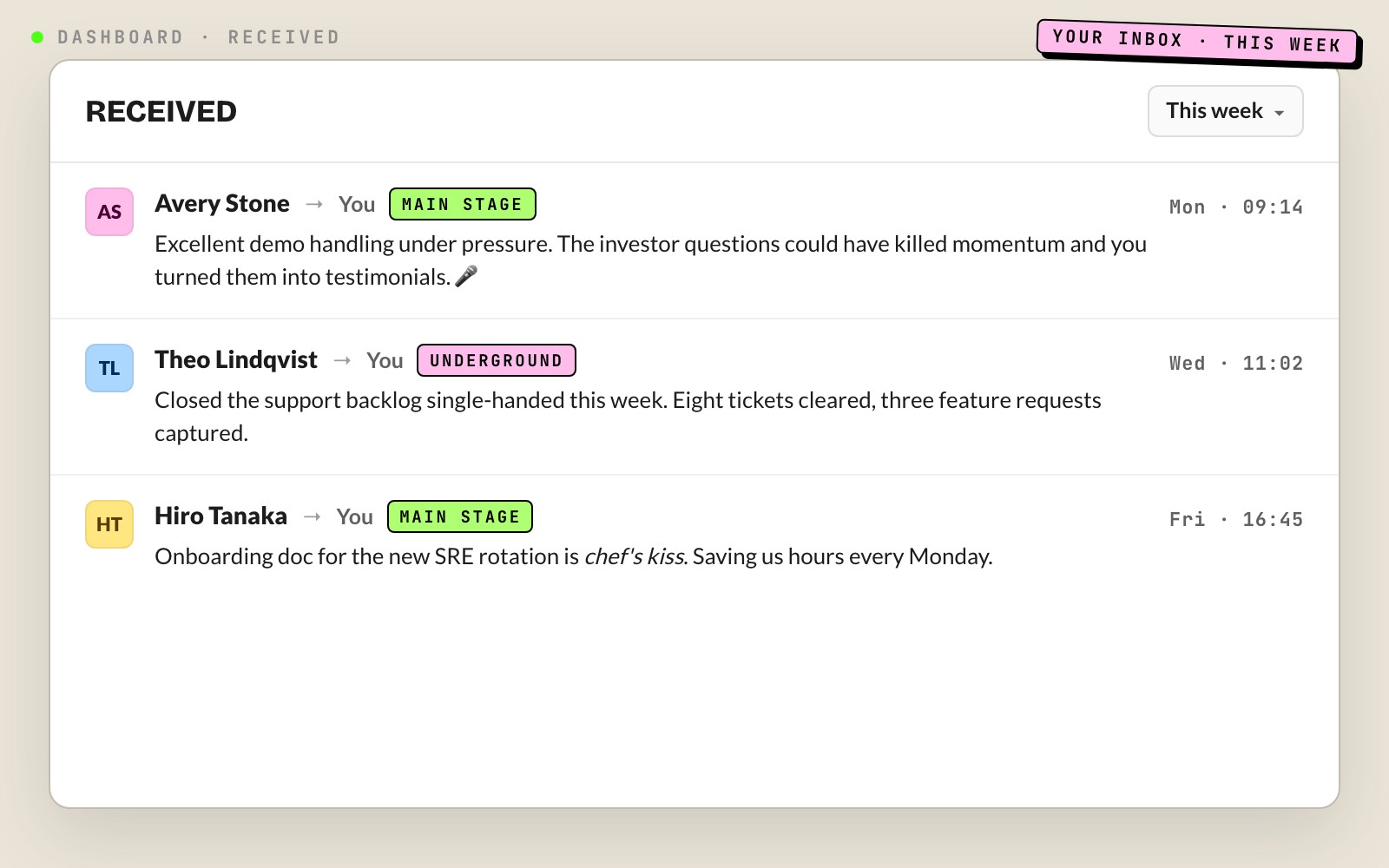
Received

Every kudos you received in the selected period. Sender, message, date. Honours the period dropdown at the top.

Kudos Punk web dashboard Received tab with three kudos from this week, each showing sender avatar, message text, and timestamp.

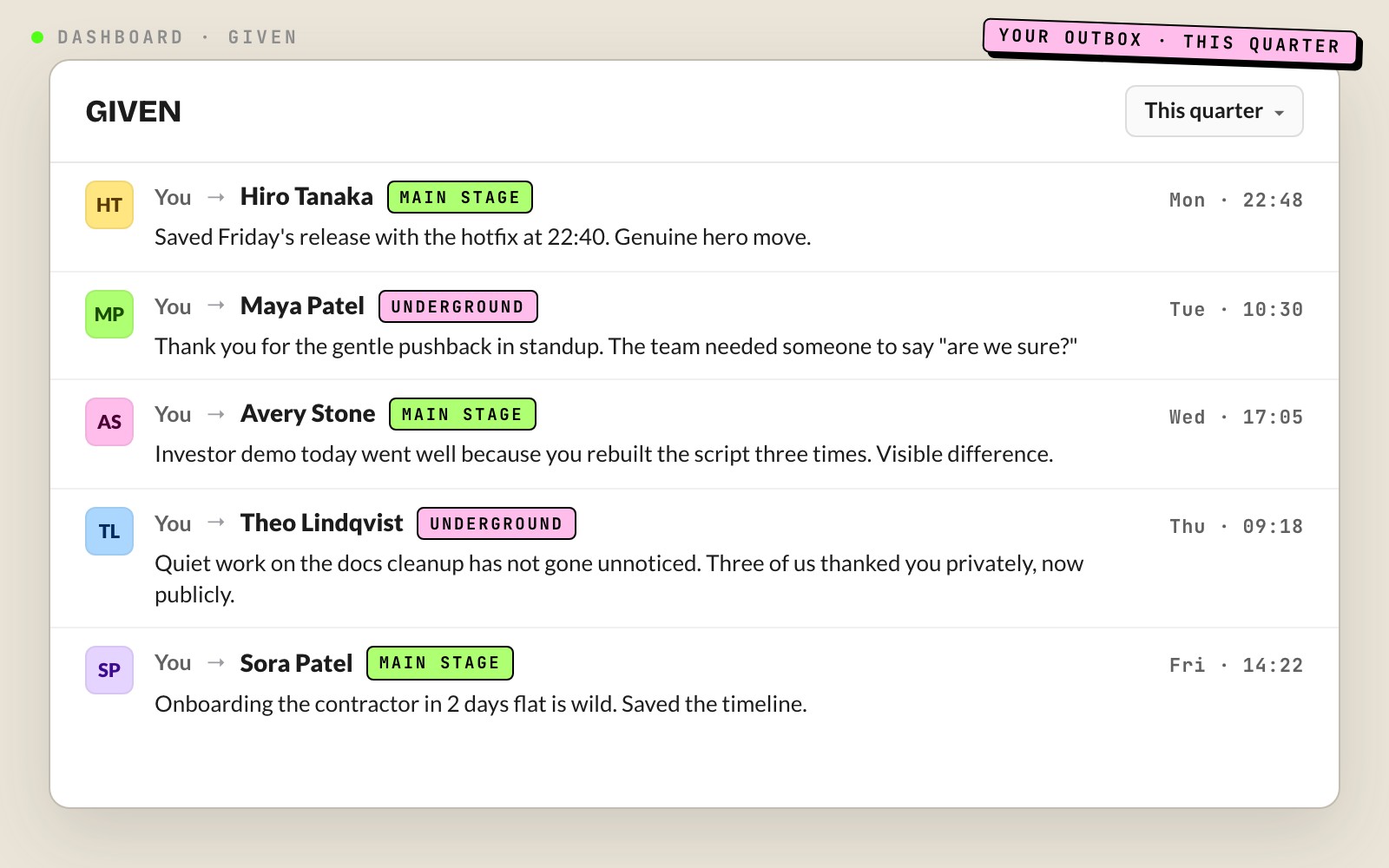
Given

Every kudos you sent in the selected period. Useful for keeping yourself honest about how often you celebrate teammates.

Kudos Punk web dashboard Given tab listing five kudos the signed-in user sent in the current quarter.

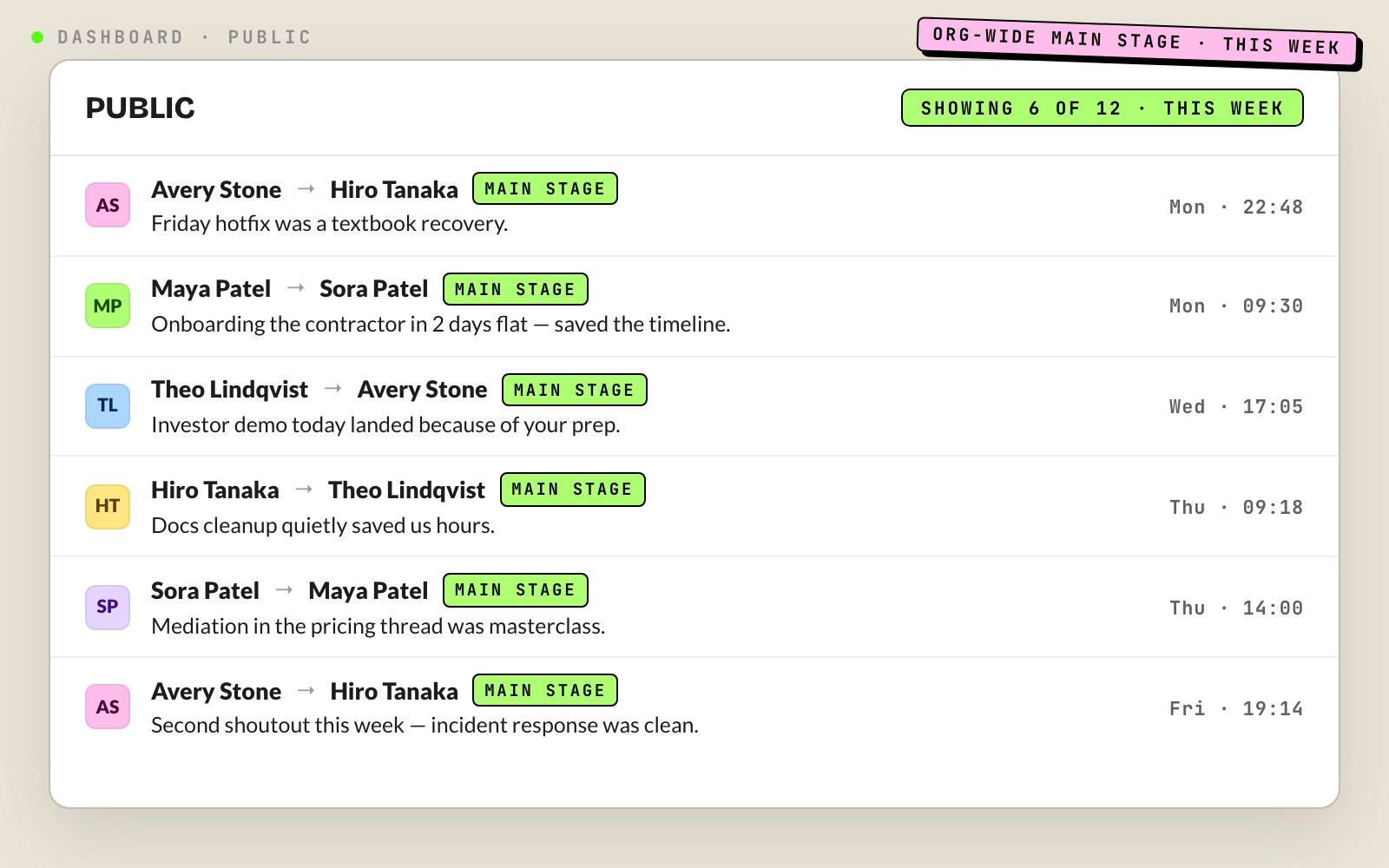
Public

Org-wide public kudos in the selected period. The single source of truth for what made it onto the Main Stage.

Kudos Punk web dashboard Public tab showing six visible org-wide public kudos this week, with twelve total.

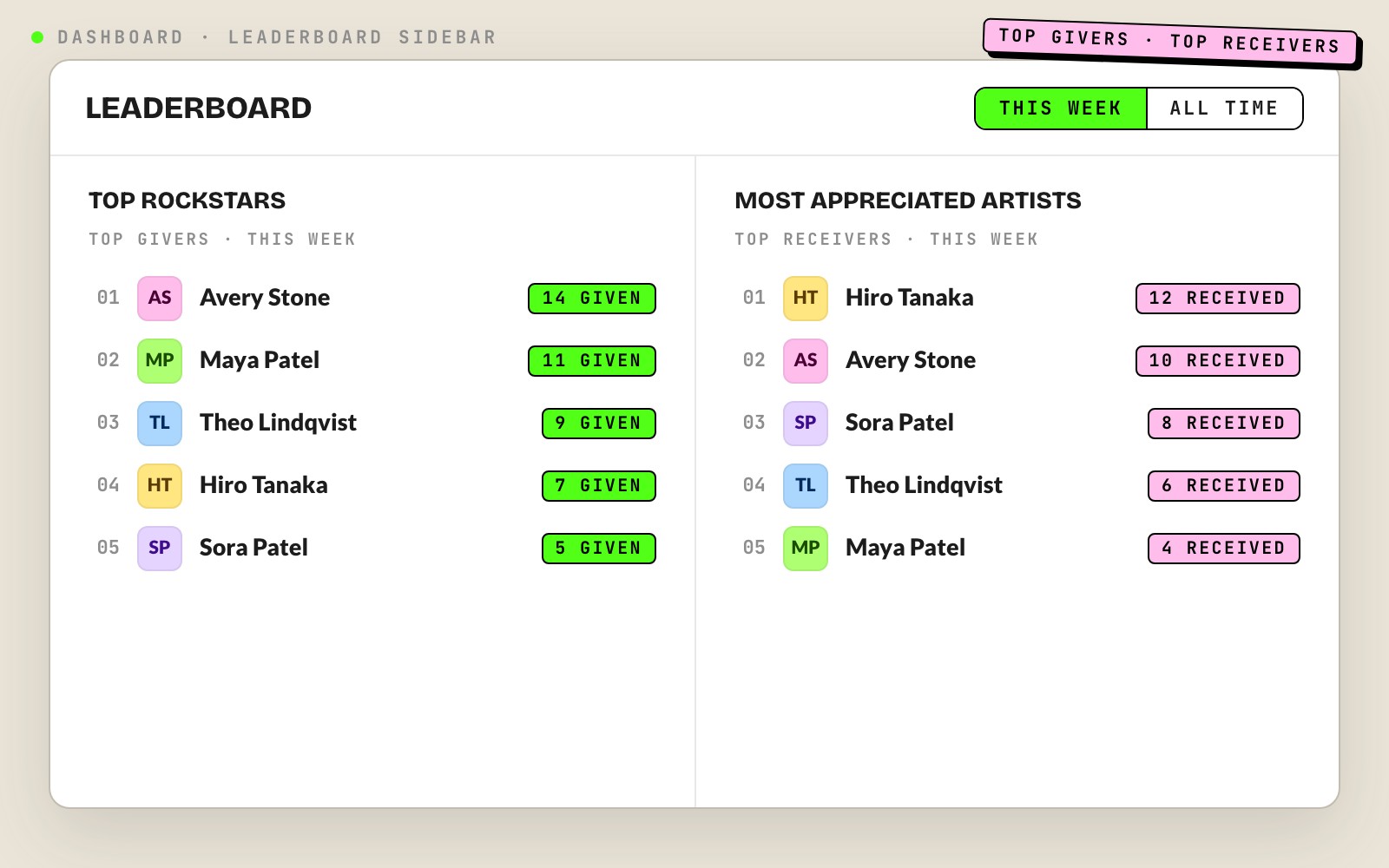
Leaderboard (sidebar)

Right-side panel always visible alongside the active tab. Top givers and top receivers for the selected period plus an all-time fallback. Read-only.

Kudos Punk dashboard sidebar listing the top five kudos givers and top five receivers for the current period.

Optional admin extension

Kudos Survey

An opt-in admin tool for structured peer nomination at review time.

Kudos Survey lives at /kudos in the web dashboard and is separate from the day-to-day bot. Admins send a nomination survey to the team, collect structured shoutouts, and view results as a bar chart. Per-user comments are expandable inline and the full export goes to XLSX for quarterly review prep. Use it once a quarter alongside performance cycles, not as a replacement for the real-time bot. The bot handles ongoing recognition; the Survey handles structured retrospective nomination.

Frequently asked

Kudos Punk FAQ

Peer recognition bot for Slack. Anyone can send a kudos to one or more teammates. Public kudos collect into a weekly, monthly, or quarterly summary the bot posts in your announcement channel. Private kudos go straight to the recipient as a DM digest. Slack-native — no roster setup, no CSV, no HR sync.

Two ways. Type /kudospunk @teammate great job on the launch in any channel — an ephemeral chooser asks Main Stage or Underground. Or open the Kudos Punk App Home and click Give Kudos to fill the modal: who, what, how loud.

Main Stage (public) kudos get featured in the next periodic summary in your announcement channel — the whole team sees them. Underground (private) kudos are delivered as a DM digest only to the recipient. Same writing, different stage.

Weekly cadence lands every Monday morning. Monthly lands on the first of each month. Quarterly lands at the start of each quarter — January, April, July, October. Summaries fire at workspace local time.

Yes. The admin sets cadence on the web dashboard. Changing mid-period rolls the current period's pending kudos into the new cadence's next dispatch — nothing is lost.

Yes. Mention several teammates in the slash command or pick multiple users in the modal. They all get credited individually in the period stats and the leaderboard.

No. Every kudos is signed by the sender. This is intentional — recognition is more meaningful when the person being thanked knows who said it.

Not per user. Kudos Punk is org-wide. If your team needs an opt-out for sensitive cases, get in touch — it is on the roadmap.

Minimal access: post messages, see the team list, run slash commands, read the bot's own DMs. No access to your team's channel history. The workspace owner can revoke access any time from Slack Settings → Apps.

Yes. The bot auto-joins when an admin picks the channel from Admin Controls. If your channel is private and the auto-join fails, invite the bot manually with /invite @kudospunk.

Two of them. The Slack Home tab and the web dashboard both show Most Appreciated Artists (top receivers) and Top Rockstars (top givers), each split into this period and all-time. They are public to the workspace and update in real time.

An optional admin extension at /kudos in the web dashboard. Admins can send a survey nominating teammates for recognition, view results as a bar chart, open per-user comments, and export to XLSX. Use it for quarterly review prep, not day-to-day kudos.

Ready when you are

Shout it loud.

Free 30 days. Three-minute install. No code, no card. Peer recognition that actually happens because it lives where your team already is.

Install Kudos Punk